
Executive summary
Enterprises IT Departments may decide to switch Sage Estimating (SE) databases from the Simple to the Full recovery model to enable point-in-time recovery and advanced High Availability / Disaster Recovery (HA/DR) options. Once in Full recovery model, you must implement a log-backup strategy and routine maintenance to prevent transaction log growth and resource pressure.
What changes when you switch from Simple → Full Recovery Model
- Transaction logs are not truncated by checkpoints; only a log backup truncates the log.
- Point-in-time restore becomes possible with a complete backup chain (Full → Diff → Logs).
- Enables features like log shipping and Always On availability groups.
Required DBA actions after switching to Full
- Create a backup chain: immediately take a Full backup after the switch; without it, log backups will fail.
- Schedule transaction log backups (typical starting point: every 15 minutes; adjust to meet the Recover Point Objective (RPO)).
- Add differential backups between fulls to shorten restores that align with targeted SLA.
- Enable backup verification (WITH CHECKSUM) and perform scheduled test restores.
- Monitor log space (sys.dm_db_log_space_usage) and Virtual Log Files (VLFs) (sys.dm_db_log_info) to avoid excessive VLF counts.
- Implement index maintenance with thresholds: reorganize around 10–30% fragmentation; rebuild when >30% (See Microsoft guidance here: https://learn.microsoft.com/en-us/sql/relational-databases/indexes/reorganize-and-rebuild-indexes).
- Run regular DBCC CHECKDB and alert on failures.
- Size data and log files appropriately; use sensible autogrowth (fixed MB, not %).
- Document and test HA/DR if using Availability Groups (AGs) / log shipping; align with RPO / Recovery Time Objective (RTO).
Maintenance flow
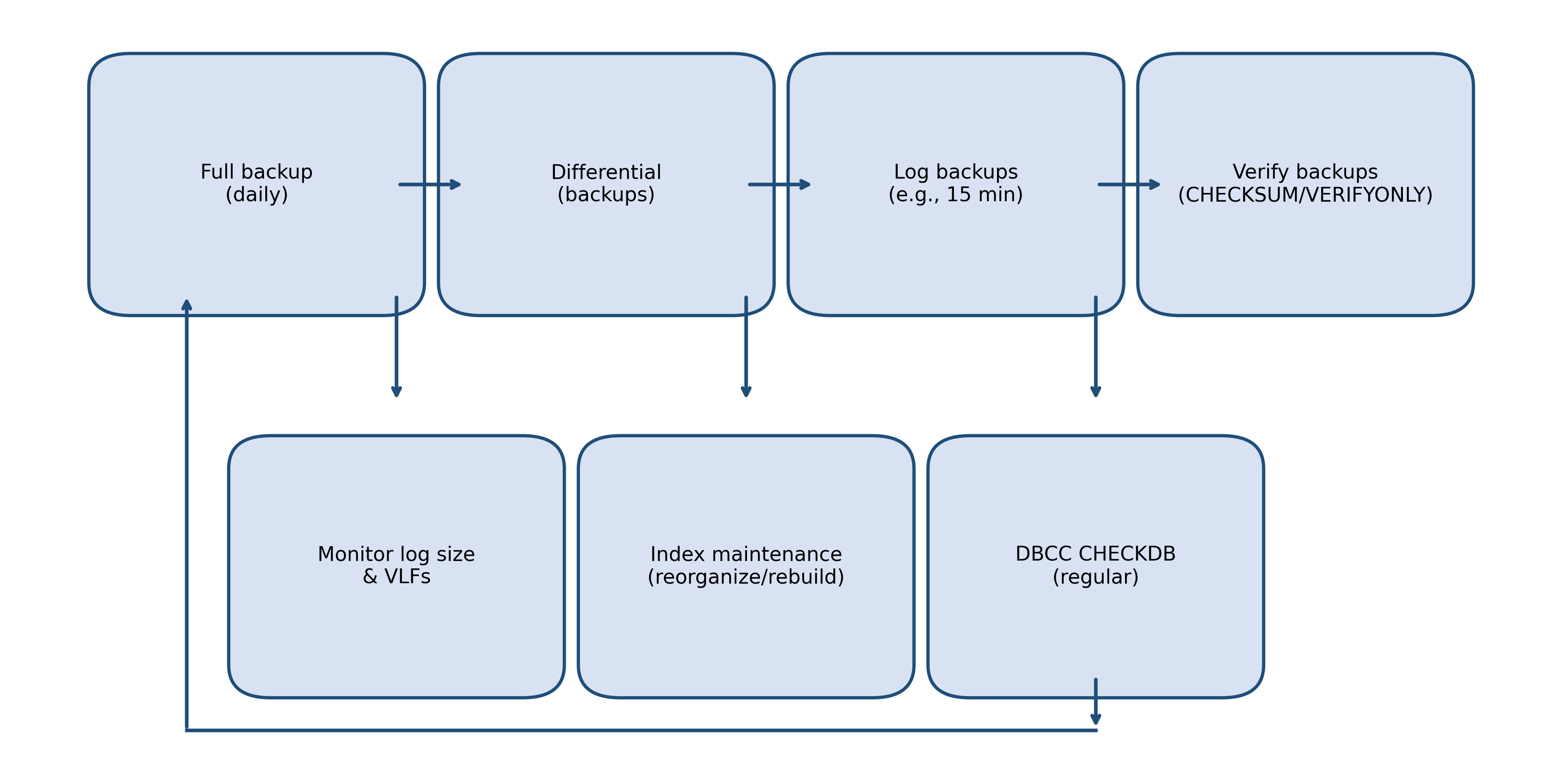
Monitoring & telemetry
Track log usage with sys.dm_db_log_space_usage and VLF health with sys.dm_db_log_info. Alert if used_log_space_in_percent exceeds a threshold (e.g., 70%) or VLF count rises abnormally after growth events. Enable Query Store for plan regressions and to correlate maintenance windows with query performance changes.
Implementation checklist
- Confirm recovery model = FULL
- Take a Full backup immediately after switching
- Create SQL Agent jobs: Full (weekly/daily), Differential (daily), Log (every 15 min)
- Enable backup compression + CHECKSUM
- Set fixed-size autogrowth for data/log files
- Create index maintenance job (reorganize/rebuild per thresholds)
- Schedule DBCC CHECKDB (weekly; adjust for size/criticality)
- Implement monitoring for log space, VLFs, failed jobs
- Document restore drills and perform test restores quarterly
Sample T‑SQL (templates)
* Ensure backups have been taken before performing any changes to your environment. Always test in a non-production environment. Consult your SQL DBA or Microsoft representative before executing any SQL scripts.
Switch to FULL and start the log backup chain:
ALTER DATABASE [YourDB] SET RECOVERY FULL;
GO
-- Start the chain
BACKUP DATABASE [YourDB] TO DISK = N'D\\SQLBackups\\YourDB_full.bak' WITH INIT, CHECKSUM, COMPRESSION, STATS = 10;
GO
-- Now log backups will truncate properly
BACKUP LOG [YourDB] TO DISK = N'D\\SQLBackups\\YourDB_log_$(ESCAPE_SQUOTE(DATE)).trn' WITH CHECKSUM, COMPRESSION;
Monitor log space and VLFs:
-- Log space usage
SELECT used_log_space_in_percent FROM sys.dm_db_log_space_usage;
-- VLF inventory (SQL Server 2016 SP2+)
SELECT COUNT(*) AS VLFCount, SUM(vlf_size_mb) AS VLF_MB
FROM sys.dm_db_log_info(DB_ID());
Fragmentation-driven index maintenance (example thresholds):
-- For each index, reorganize if avg_fragmentation_in_percent between 10 and 30; rebuild if > 30
-- See Microsoft guidance on reorganize vs rebuild thresholds.
EXEC dbo.usp_EosIndexMaintenance @DBName = N'YourDB', @LowFrag = 10, @HighFrag = 30;
Downsides / risks of switching to Full
- Requires ongoing log backups; without them, transaction logs grow until the disk fills.
- More storage consumption for log backups and potentially for the log file itself.
- Higher administrative overhead (jobs, monitoring, restore testing).
- Maintenance operations (index rebuilds, CHECKDB) need planning to avoid competing with user workload.
References
- Recovery models (Microsoft Learn): https://learn.microsoft.com/en-us/sql/relational-databases/backup-restore/recovery-models-sql-server
- Backup and restore of SQL Server databases (Microsoft Learn): https://learn.microsoft.com/en-us/sql/relational-databases/backup-restore/back-up-and-restore-of-sql-server-databases
- Optimize index maintenance (Microsoft Learn): https://learn.microsoft.com/en-us/sql/relational-databases/indexes/reorganize-and-rebuild-indexes
- sys.dm_db_log_info (VLFs) (Microsoft Learn): https://learn.microsoft.com/en-us/sql/relational-databases/system-dynamic-management-views/sys-dm-db-log-info-transact-sql
- sys.dm_db_log_space_usage (Microsoft Learn): https://learn.microsoft.com/en-us/sql/relational-databases/system-dynamic-management-views/sys-dm-db-log-space-usage-transact-sql
- DBCC CHECKDB (Microsoft Learn): https://learn.microsoft.com/en-us/sql/t-sql/database-console-commands/dbcc-checkdb-transact-sql
- Query Store overview (Microsoft Learn): https://learn.microsoft.com/en-us/sql/relational-databases/performance/monitoring-performance-by-using-the-query-store
- Ola Hallengren’s free database maintenance scripts: https://ola.hallengren.com/
The End.